Quick start
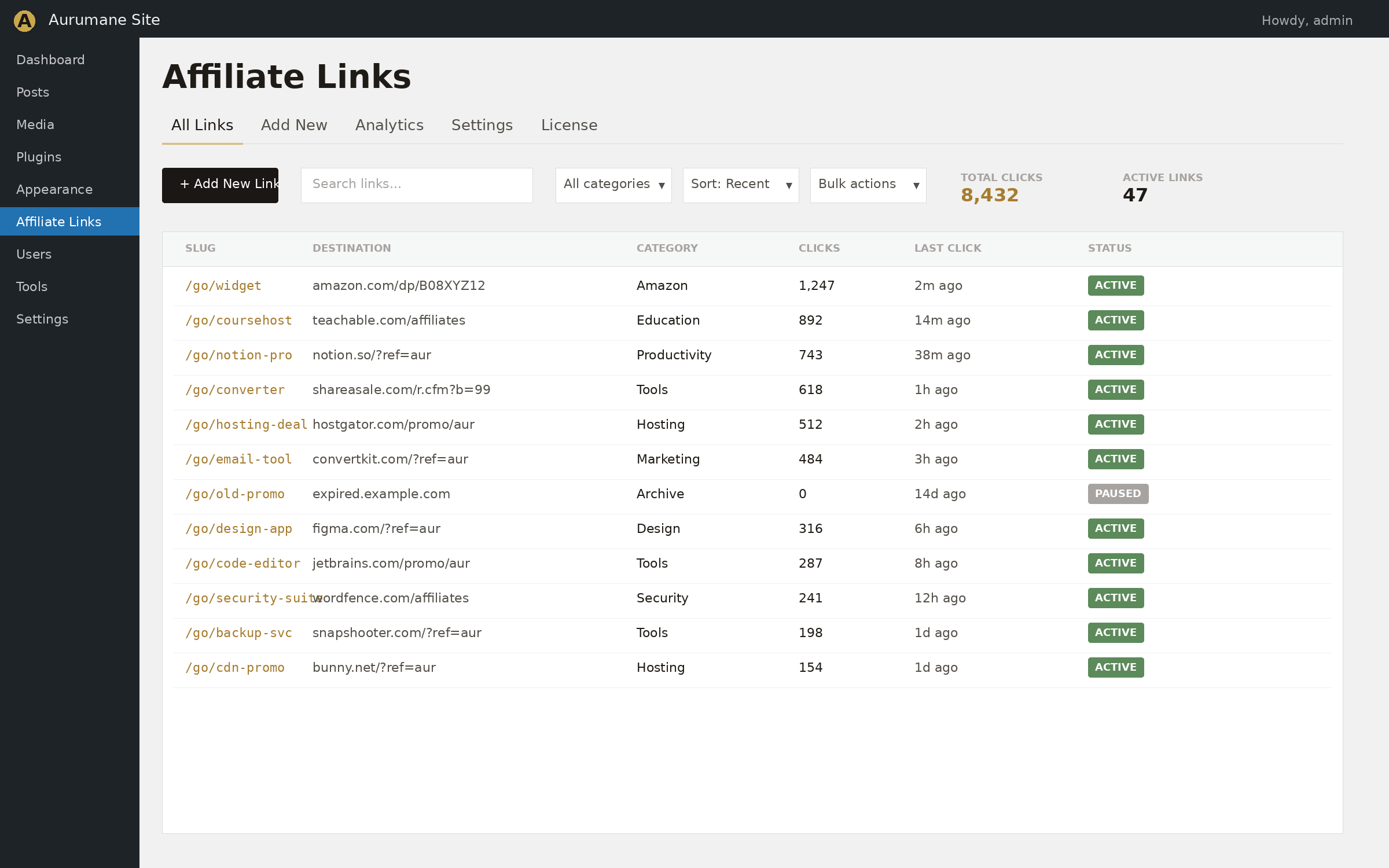
Install the plugin from the WordPress directory and activate it. A new Affiliate Links menu item appears in your admin sidebar. Click it, fill in a slug and a destination URL, and save. Your first cloaked link is live immediately at yourdomain.com/go/your-slug.
That's the entire setup. No onboarding wizard, no account creation, no API key.
Adding and managing links
Each link has a few fields:
Link Name (Pro only) — an internal label. Useful when you have several links pointing at variations of the same product or campaign. Free users skip this and just use the slug as the identifier.
Slug — the URL segment after your prefix. Letters, numbers, and hyphens only. Auto-generated from the name in Pro if you leave it blank. Required.
Destination URL — the long affiliate URL the slug should redirect to. Must start with http:// or https://. Anything else is rejected at save time to prevent javascript: and data: URL attacks.
Redirect Type — 301 (permanent, default) or 302 (temporary). Use 301 for permanent placements like a review post you don't intend to change. Use 302 for testing or rotating links where you might swap the destination later, since 301s get cached aggressively by browsers.
Nofollow — when checked, the redirect carries rel="nofollow sponsored" attribute compliance for FTC and Google's sponsored-content guidelines. Recommended for most affiliate links. On by default.
After saving, the new link appears in the table on the same page with a Copy button next to its short URL. Click Copy to put the cloaked URL on your clipboard and paste it into any post or page.
Settings reference
The settings page differs between Free and Pro.
Free version: all controls are on the single Affiliate Links page. The form for adding/editing links is at the top; the link list is below it. The URL prefix is fixed at /go/.
Pro version: the page has two tabs.
Links tab (Pro)
The default view. Shows summary cards (total links, total clicks), the link list with a Stats button per row, and an Export CSV action in the page header.
Settings tab (Pro)
Cloak prefix — the URL segment used for cloaked links. Default go, producing URLs like yoursite.com/go/your-slug. Change to out, recommend, r, or any other token. Letters, numbers, and hyphens only, max 32 characters. Saving immediately re-registers the rewrite rules — you don't need to manually flush permalinks.
License section — paste the key from your Lemon Squeezy purchase receipt and click Activate. The plugin contacts the Lemon Squeezy API once to register the site, then unlocks Pro features. To move the license to a different site, click Deactivate License on the current site first, which frees the seat.
The 30-day stats view (Pro)
Click Stats on any link in the Pro list to open its analytics view. The page shows:
- The total click count for the link
- A 30-day line chart of daily clicks, rendered with Chart.js
- Days with no clicks are zero-filled, so the chart is continuous and trend lines are visible
The Chart.js library is only loaded on this page — the rest of the admin runs without any JavaScript dependencies.
The data behind the chart comes from a separate wp_alm_click_log table in your database. Every click writes one row with a date stamp. The chart aggregates by date for the requested window.
CSV export (Pro)
On the Pro Links tab, click Export CSV in the page header. You'll get a download named affiliate-links-YYYY-MM-DD.csv with one row per link. Columns:
- Name
- Short URL (the full cloaked URL with your domain and prefix)
- Destination (the original affiliate URL)
- Redirect type (301 or 302)
- Nofollow (Yes/No)
- Total clicks
- Created date
The export is sorted by total clicks descending, so your top performers are at the top. Files are written with a UTF-8 BOM, which means Excel opens accented characters and currency symbols correctly without any import gymnastics.
The export does not include the daily click log — only the link list with totals. If you need raw daily click data, query the wp_alm_click_log table directly.
A live demo
The hero section above this page has a working version of the cloaker. Paste any URL into the field and the plugin will generate a real cloaked URL on this domain. Click it. The redirect works exactly the way it would on your own site. The demo is rate-limited and the cloaked URLs expire after an hour, but it's the actual plugin running with real settings.
Upgrading from free to Pro
Pro is a complete replacement for the free plugin, not an add-on. When you upload and activate Pro:
- The free version is automatically deactivated
- Pro reads the existing
wp_alm_links table — your links and click totals are preserved
- The schema is upgraded: a
name column is added, and existing links have their slug copied into the name field as a starting label so they're not blank
- The new
wp_alm_click_log table is created (clicks recorded going forward will appear in charts)
- Rewrite rules are flushed so cloaked URLs continue to work without interruption
There's no manual migration step. The transition is seamless on activation.
Note that the daily click log only tracks clicks recorded after Pro is installed — the chart for the first 30 days post-upgrade will start empty for older links and fill in as new clicks come in.
Common workflows
Add a link to a blog post
Create the link in the admin (slug + destination URL). Copy the cloaked URL from the Copy button. Paste it as a regular link in your post. WordPress doesn't need to know it's a redirect — the post just contains a URL on your own domain.
Update a destination URL without editing posts
Edit the link in the admin and change just the Destination URL field. Save. Every post or page that links to the cloaked URL now redirects to the new destination. No post edits required.
Test a new affiliate before committing
Use a 302 redirect when you first set up the link. Browsers won't cache the redirect, so if you swap the destination, visitors get the new one immediately. Once you're sure the affiliate is working and converting, switch to 301 for the SEO benefit.
Use a custom prefix to match your site's voice (Pro)
In Settings → Cloak prefix, change go to recommend, partners, buy, or whatever fits. Cloaked URLs become yoursite.com/recommend/your-slug. Existing links keep working — only the prefix changes.
Skip tracking on internal monitoring (developers)
If you use uptime monitors that hit your cloaked URLs to verify they redirect, those clicks inflate your stats. Use the alm_should_track_click filter to skip tracking based on user agent. See the developer hooks section.
Troubleshooting
Cloaked URLs return 404
The rewrite rule isn't registered. Visit Settings → Permalinks in your WordPress admin and click Save (without changing anything). This re-flushes the rewrite rules. If that doesn't work, deactivate and reactivate the plugin — activation flushes rewrite rules automatically.
I changed the prefix but old URLs still work
Old URLs return 404 immediately after a prefix change. Saving the prefix automatically flushes rewrite rules. If you want both old and new prefixes to work during a transition, you'll need a redirect rule at the server level (an .htaccess rule on Apache, or an Nginx rewrite).
Click counts aren't incrementing
Check that the cloaked URL actually redirects when you click it — if it 404s instead, the rewrite isn't matching. If the redirect works but the count stays at zero, you may have a caching plugin or CDN that's serving the cloaked URL without hitting WordPress. Add an exclusion in the cache plugin for the prefix path (e.g. /go/*).
Pro 30-day chart is empty even though I have clicks
The daily click log only records clicks after Pro is installed. If you upgraded from free recently, the chart will start filling in as new clicks come through. The total click count carries over from the free version — that's why the totals don't match the chart for older links.
CSV opens with garbled accents in Excel
The export includes a UTF-8 BOM, which Excel needs to detect the encoding. If you're seeing garbled text, you might be opening it in a tool that strips the BOM, or you're on a much older Excel version. Try Excel 2016+ or open in Google Sheets, which handles UTF-8 natively.
Frequently asked questions
Does this slow down my site?
No. The plugin uses the WordPress rewrite system, so the redirect logic only runs when a cloaked URL is actually requested. Normal page loads are completely unaffected. Even on the cloaked URL itself, the work is one database read, one update, and a redirect — no template rendering, no plugin chain.
Is this compatible with caching plugins?
Yes. Redirects bypass page caches automatically because they happen at the WordPress rewrite layer, before page rendering. If a CDN is caching at the edge, you may need to exclude your prefix path (e.g. /go/*) from CDN caching, otherwise the CDN can serve the redirect without WordPress getting a chance to count the click.
What happens if I redirect to a javascript: or data: URL by mistake?
The plugin blocks any destination URL that doesn't start with http:// or https://. The save handler rejects it, and the redirect handler refuses to follow it.
Can I customize the cloak prefix?
In Pro, yes. The Settings tab has a Cloak prefix field. The default is go; you can change it to out, recommend, r, or any other URL-safe token. The free version is fixed at /go/.
Where is my data stored?
In one or two custom database tables on your own site. Free uses wp_alm_links. Pro adds wp_alm_click_log for daily click tracking. Nothing is sent externally. The Pro license check is the only outbound HTTP call — once on activation, once on deactivation, with the Lemon Squeezy API.
How do I uninstall completely?
Deactivate the plugin and delete it from the Plugins screen. The plugin's database tables and options are removed automatically by the uninstaller.
Developer hooks
Affiliate Link Manager exposes filters for integrations.
Filter: alm_should_track_click
Return false to skip click tracking for a specific request. Useful for excluding internal monitoring, bots, or specific user agents from inflating your click counts.
add_filter( 'alm_should_track_click', function( $should, $link ) {
    $ua = isset( $_SERVER['HTTP_USER_AGENT'] ) ? $_SERVER['HTTP_USER_AGENT'] : '';
    if ( strpos( $ua, 'UptimeRobot' ) !== false ) {
        return false;
    }
    return $should;
}, 10, 2 );
Filter: alm_redirect_url
Modify the destination URL just before the redirect happens. Useful for appending UTM parameters, applying region-specific affiliate IDs, or rotating between several destinations.
add_filter( 'alm_redirect_url', function( $url, $link ) {
    return add_query_arg( array(
        'utm_source'   => 'mysite',
        'utm_campaign' => $link->slug,
    ), $url );
}, 10, 2 );
The filtered URL must still pass the http:// or https:// validation; if your filter returns something else, the request is rejected at wp_die.
Support
Questions, bug reports, and feature suggestions go to info@aurumane.com. Pro license holders get a faster reply. Free users get the same answer, just sometimes a day later. Either way, the reply comes from the developer who wrote the plugin.